Windows

Contents
If you are not familiar with the purpose or use of the Windows configuration dialog, review the main configuration dialogs topic before continuing.
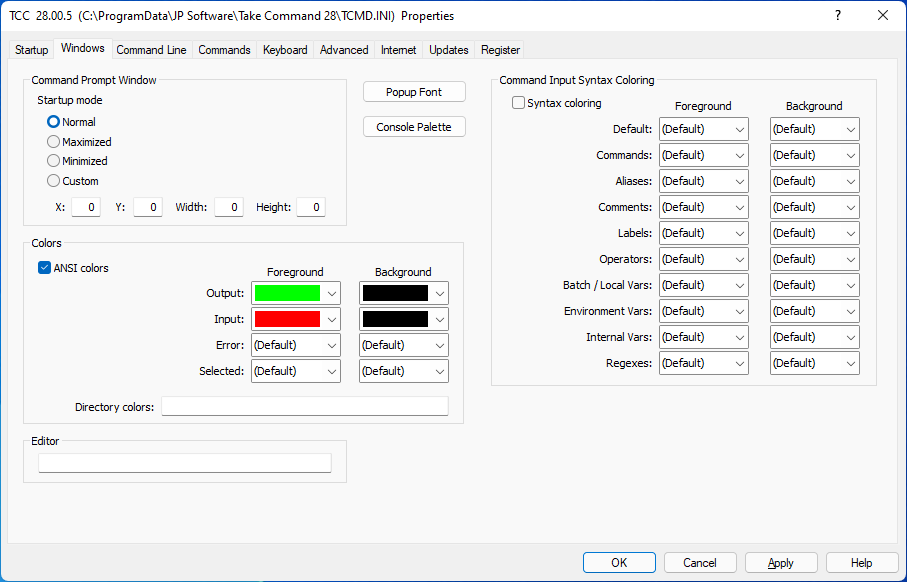
Command Prompt Window
(These options are only used when TCC is not running in a Take Command tab window.)
The Normal, Max, Min, and Custom buttons select the initial state for the TCC window.
The X, Y, Width, and Height fields set the initial size and position of the TCC window. They are ignored unless the Custom button is also selected.
Colors:
ANSI Colors : Enable ANSI X3.64 string processing of the output of Take Command internal commands. Note that ANSI X3.64 processing of the output of external applications is not supported. See the ANSI X3.64 Commands Reference for a list of the ANSI X3.64 commands supported by TCC.
Colors : Select foreground and background colors for input, output, and error messages.
Directory Colors : Sets the directory colors used by DIR and SELECT. The format is the same as that used for the COLORDIR environment variable. See Color-Coded Directories for a detailed explanation.
Editor:
Editor : The pathname of the editing program to run from LIST if there is no Windows "edit" association for the extension. (The default is NOTEPAD.EXE.)
Pop-Up Font:
Set the font to use in the command history, directory history, filename completion, and fuzzy directory searching popup windows.
Console Palette:
Defines a custom color palette, not restricted to the standard console window 16 colors. This will not work when running TCC in a Take Command tab window due to a Windows API bug. (But you can define custom palettes in Take Command for tab windows.)
Syntax Coloring:
TCC supports syntax coloring on the command line (similar to the syntax coloring in the IDE / batch debugger). You set the option and the colors to use in the OPTION / Windows dialog. You can define both foreground and background using any of the 16 Windows console colors. TCC will colorize:
•Default - any text that doesn't match a syntax option
•Commands - internal TCC commands
•Aliases - command aliases defined with the TCC ALIAS command.
•Comments - lines beginning with rem or ::
•Labels - labels for a GOTO or GOSUB
•Operators - | < > && || etc.
•Batch / Local Vars - %1 - %n, %*, %~... etc.
•Environment Vars - environment variables
•Internal Vars - internal TCC variables and variable functions
•Regexes - regular expressions