Take Command Registration

Contents
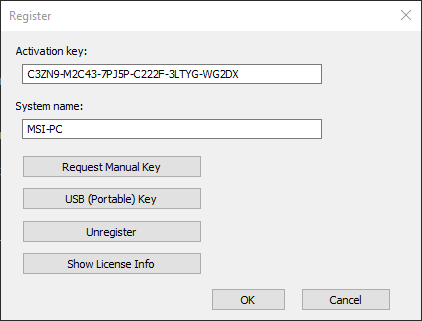
There are no separate trial and registered versions of Take Command. Without registration, a trial version is fully functional for 30 days of use.
At any time you can apply your current personal registration information to a trial version in order to turn it into a registered product. Use the command VER /R from the TCC prompt to verify the status of the copy you are currently running. You can also view the Help/About menu entry in Take Command.
When you purchase a new or upgrade copy of Take Command, you will receive an email with your name and registration key. Start Take Command, click on the Help menu entry and then Register. Select the Register tab and enter the registration information exactly as you received it in the email. Remember to save your registration key in a safe place in case you need to reinstall. If you have lost your registration key, you can request a replacement by contacting JP Software at [email protected].
You can unregister any system, provided you have the original activation key and the name of the computer to unregister. Click on the Help menu entry and then Register. The registration dialog has an "Activation key" field, and a "System name" field for the computer name (which defaults to the current system). Enter the activation key you received with your order email, and the name of the computer you wantto unregister. Click the "Unregister" button to remove the specified system. Take Command will open a web page on your browser with the unregistration result.
You can generate a manual key (one that doesn't require internet activation) on any system, provided you have the original activation key and the name of the computer to register, and the system where you request the key does have internet access. The registration dialog has a "System name" field for the computer name (which defaults to the current system). Enter the name and click the "Request Manual Key" button. Take Command will open a web page on your browser that returns the manual key. Copy that key value and enter it in the "Activation Key" field on the registration dialog on the computer you want to register.
You can display your license info on the registration server. Bring up the registration dialog, enter your activation key and click on the "Show License Info" button. Take Command will open a web page on your browser that shows the maximum number of systems you can register, the name(s) of registered systems, and the dates they were registered.
TCC Registration
If you ordered the stand-alone version of TCC, you can register it by running the OPTION command and clicking on the Register tab. The registration dialog is the same as described above for Take Command.