Replace Your Windows Console and CMD Command Prompt Windows
The Windows Command Prompt shortcut is a Windows console (command line, or character mode) session that runs the default Windows command shell CMD.EXE.
The command line is essential for developers, systems administrators and advanced users. Unfortunately, CMD Windows commands and the Windows console UI have always been woefully lacking in ability compared to what is available in most other operating systems. Because of the limitations in CMD and the Windows console, users have been forced to use the GUI for inappropriate tasks, or even to write custom programs to perform simple tasks that CMD should have been able to handle.
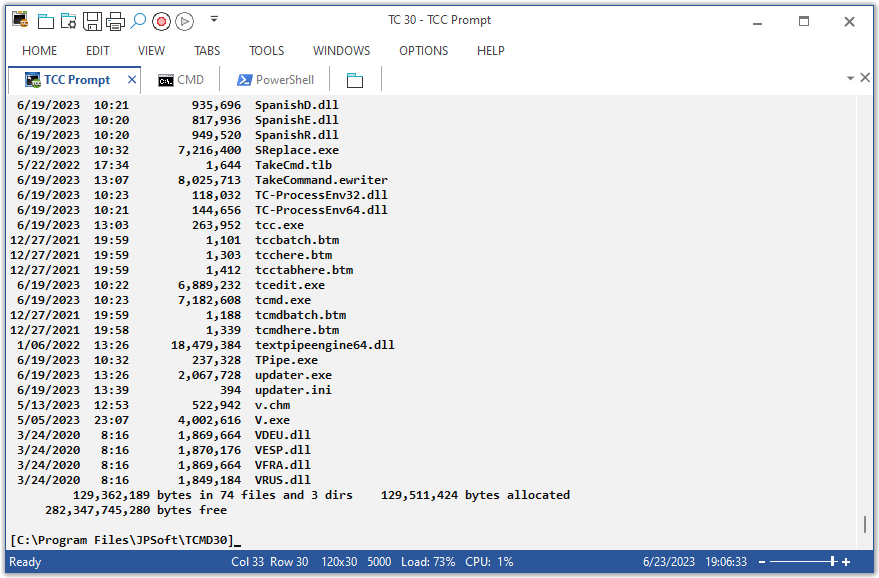
Take Command is a comprehensive interactive GUI and Windows command line toolkit that makes your command prompt windows easier to use and far more powerful. Take Command includes optional Windows Explorer integration, tabbed console windows, and major enhancements to standard Windows CMD commands such as COPY, DEL, DIR, FOR, MOVE, REN, SET, and START And it and adds more than 225 new commands, command dialogs, command line syntax coloring, vastly improved command line editing, programmable filename and directory tab completion, and thousands of other features.
Take Command is also a powerful batch file programming tool, including an integrated IDE with a sophisticated editor and batch debugger. Take Command offers extensions such as DO loops, SWITCH statements, error and exception handling, system monitoring and event triggers, and more than 780 built-in variables and functions. And you can extend that with 3rd-party plugins and user-defined functions.
12 Reasons Why You Should Replace Your Windows Console
The Windows console is responsible for running character-mode applications, including CMD, PowerShell, WSL bash, etc. It was introduced in Windows NT 3.1 in 1993, and some major internal architectural improvements were made in Windows 10 and 11.
Unfortunately, the improvements to the user interface were relatively minor, and though some efforts were made to improve the CMD console UI in Windows Terminal, they fall far short of what Take Command has been providing for years.
So why replace it with Take Command?
- The Windows console is slow, and even slower when using Windows Terminal. Take Command's tab windows typically display output between 20% and 300% faster.
- Take Command (like Windows Terminal) offers tabbed windows to run your character-mode applications. But Take Command takes it to another level by including vertical or horizontal tab groups and splitter windows.
- Tabbed windows can be reordered, detached, or torn off, and existing console windows can be attached as new Take Command tab windows.
- Take Command provides an optional embedded Windows File Explorer window that displays a tree view of the folders on your system and the contents of the selected folder (List View) on the right. You can drag folders and files from the Explorer window and drop them in a command prompt window.
- Take Command can be easily configured for your preferences with its configuration dialogs.
- Take Command has an optional tabbed tool bar that you can use to execute internal or external commands, aliases, or batch files with the click of a mouse (or an accelerator key). You can define up to 20 tabs, each with up to 50 toolbar buttons.
- Take Command provides a configurable Status Bar that can display quick help for the current command, tooltips, and system information, including tab window size, CPU usage, memory usage, date & time, character values at the cursor location, and a slider control for window transparency.
- Cut and Paste options are limited in the default CMD console or Windows Terminal. Take Command adds both line and column selection, double-click or triple-click selections, overwriting or appending to the Windows clipboard, and a variety of paste options.
- Take Command windows can be styled with a choice of 18 themes.
- Take Command and TCC offer a wide variety of colorization options, not just foreground and background colors.
- Take Command includes invaluable tools, including a batch file debugging IDE, a regular expression creator / analyzer, search and replace in files, and a macro recorder / playback.
- Extensive help (quick help, context sensitive help, and general help) is available in English, French, German, and Spanish at the touch of a button.
Solving Your CMD Windows Commands Frustrations
Compatible with CMD.EXE
Take Command is a CMD and Windows console replacement that is upwardly compatible with your existing CMD commands and CMD batch files, while adding thousands of new features.
Multilingual
The user interface is available in English, French, German, Italian, Russian, and Spanish. (Online help is available in English, French, German, and Spanish.)
Customizable
Take Command is fully customizable, including multiple themes, input, output, and error colors, syntax coloring, menus, toolbars, and moveable / dockable windows.
Familiar
The integrated and familiar environment means you are immediately more productive with your command line and batch file programming tasks.
Fast
It's fast - 20-200% faster at displaying output than the CMD command prompt in Windows. And Take Command runs your batch files faster than CMD!
Popup Help
The comprehensive help (including context-sensitive popup help for command line commands syntax), speeds your development time and reduces syntax errors.
Take Command is our flagship product. For 30+ years, JP Software has been helping programmers, system administrators, technical support professionals, and advanced users save time and money, and solve their Windows command line frustrations. Take Command offers a new approach to working in console windows, bringing users the power of the command line and the ease of use of the Windows GUI. Take Command includes a compatible CMD.EXE replacement Windows command shell that provides you with a vastly better UI, and thousands of features that are not available at the CMD command line (or even in those vaunted Linux shells).
An Unrivaled Command Shell and Windows Console Replacement



Support Forums : Your Windows Command Line Companion
With Take Command, you'll not only have access to a wide range of powerful features and enhanced commands, but also a supportive community of Windows command shell and command prompt enthusiasts. The JP Software Support Forums are a valuable resource for learning new tricks, sharing tips, and getting help when you need it. The Forums are also the place for the latest updates, announcements, and product releases from JP Software.
The Support Forums include forums for Take Command, TCC, CMDebug, and TCC-RT support, Tips and Tricks, TCC Plugins, and Suggestions for future versions.

Satisfaction Guarantee
We stand behind our products 100% -- if you are not completely satisfied with your individual copy of any JP Software product, return it within 90 days for a full refund. For complete details and terms see the Satisfaction Guarantee section of our Software License.