Welcome!

By registering with us, you'll be able to discuss, share and private message with other members of our community.

SignUp Now!

function not working

Aug
69
3
I am simply trying to use function command, but even the examples in the help file aren't working for me.

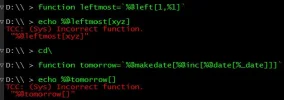
D:\\ > function leftmost=%@left[1,%1]

D:\\ > echo %@leftmost[xyz]
TCC: (Sys) Incorrect function.

"%@leftmost[xyz]"

D:\\ > function tomorrow=%@makedate[%@inc[%@date[%_date]]]

D:\\ > echo %@tomorrow[]
TCC: (Sys) Incorrect function.
"%@tomorrow[]"

Please tell me what I'm doing wrong.
 
You're forgetting the strong quotes around the function definition:
Code:
C:\>function leftmost=`%@left[1,%1]`

C:\>echo %@leftmost[xyz]
x

C:\>

Without the quotes, all that stuff to the right of the equals sign is evaluated before the function is defined. And what it evaluates to is nothing, so you are effectively undefining the function:
Code:
C:\>function leftmost=%@left[1,%1]

C:\>function leftmost
TCC: Not a function "leftmost"

C:\>

Instead of the strong quotes, you could instead double all of the percent signs:
Code:
C:\>function leftmost=%%@left[1,%%1]

C:\>function leftmost
%@left[1,%1]

C:\>echo %@leftmost[Now is the time]
N

C:\>

... But that gets old real fast.
 
Thank you for your reply, Charles, but I DID use the strong quotes. The just don't seem to show when I cut and paste my code into the forum. I have therefore attached a screen capture to show you that I copied the code directly from the help file.
 

Attachments

  • FunctionErrors.webp
    FunctionErrors.webp
    20.9 KB · Views: 8
That "Incorrect function" error suggests to me that the function is not being defined. You might try
Code:
function leftmost
function tomorrow
(no equals signs, no definitions) to see what, if anything, is getting stored.
 
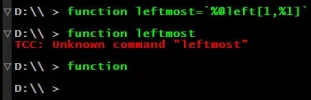
As I feared and as I confirmed with your commands, the function statement isn't storing the function. Please see the attached screen capture. And just FYI, I am running version TCC 36.52.88 x64 on Windows 11 [Version 10.0.26300.9711].

Thank you again and again for your help.
 

Attachments

  • FunctionNotBeingStored.webp
    FunctionNotBeingStored.webp
    10.9 KB · Views: 4
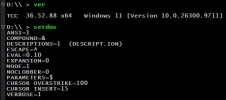
I'm having a hard time imagining what could possibly cause this. If you type SETDOS by itself, do you see anything peculiar? In particular, "Expansion" should be zero, and "Parameters" should be the dollar sign.
 
I don't know how to tell if I'm "close to that", Vince.

Also, I just put FunctionSize=512K under [4NT] and I still got the same error when I restarted TakeCommand.
 
I don't think it supports the suffix. 512K would be 524288, but that's huge. I don't have a FunctionSize directive, and TCC defaults to 32768. That's plenty for me.

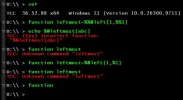
I'm completely at sea as to how that command line could not define a function. It feels as if quoting is disabled, but that's not what your SETDOS command shows. How about if you omit the quotes and double the percent signs instead?
Code:
C:\>function leftmost=%%@left[1,%%1]

C:\>function
leftmost=%@left[1,%1]

C:\>

Also, which version are you running?
 
Please see the attached screen capture, Charles. I tried what you suggested by copying your code, but again you see that it just doesn't work. I am running version 36.52.88.
 

Attachments

  • FunctionProblem_4_FunctionWithoutBackticks.webp
    FunctionProblem_4_FunctionWithoutBackticks.webp
    29.2 KB · Views: 2
I don't know how to tell if I'm "close to that", Vince.

Also, I just put FunctionSize=512K under [4NT] and I still got the same error when I restarted TakeCommand.
Use 524288 for 512K.

The MEMORY command will show you something like this. [/code]
131,072 characters total global function
129,125 characters free[/code]

According to the help, the FunctionSize directive is for a global list. I don't know if MEMORY gives info about local lists (I don't use any). In any case you can get an idea with FUNCTION > file and see how big the file is.
 
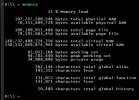
Thank you both for your yeomen's efforts to help with this problem. I've attached the results of the MEMORY command. There certainly seems to be plenty of memory!

But gentlemen, I am pleased to report that I found the problem! I entered
Code:
which function
and found that it was defined as something other than an internal command! The problem was that I had tried to use the function command inside my alias list that is called by the alias /r command inside my tcstart.btm file. Obviously, I now know that doesn't work. I unaliased function and removed the function command from my alias file and now everything is working correctly. Whew!

I moved the function that I was trying to define to inside my tcstart.btm file and now it is working, too. Yay!

Thank you again and again for your help on a Sunday evening!
 

Attachments

  • FunctionProblem_5_MemoryDetails.webp
    FunctionProblem_5_MemoryDetails.webp
    39.7 KB · Views: 1
Back
Top