Welcome!

By registering with us, you'll be able to discuss, share and private message with other members of our community.

SignUp Now!

Problems displaying UTF8 characters in tcc 32

Jan
79
1
I have a small program written in Go, that needs to display matrices. On linux in bash, the special characters display as large matrix brackets. And on Win 11, stand-alone (detached) cmd.exe, these characters display as large matrix brackets.
But in tcc 32, they merely display as small square w/ a circle inside, which I think indicates an invalid character.

This sounds to me like a bug in tcc 32, 31 and 30. I did not test earlier than that.

The UTF8 code points are 0x23a1 .. 0x23a6. Their decimal values are 9121 .. 9126.

A simple matrix program that shows this is http://drrws.com/mattest2a.exe
The source is at https://github.com/drrob1/src/mattest2a.go

How do I get tcc to correctly show matrix brackets?

--rob solomon
 
How do I determine which fonts I'm using in them, and how to I get the tcc font to be the same as cmd?
 
Thet show in TCMD but they are initially corrupted.

1710898362297.png


When TCMD is obscured and brought to the foreground (redrawn) they look better.
 
How do I determine which fonts I'm using in them, and how to I get the tcc font to be the same as cmd?

This is handled by Windows. Go to the console properties (click on the icon on the left of the cmd / tcc caption bar, then select Properties), and click on the Font tab.

Also, try starting TCC inside your CMD window and see if the characters are displayed properly there.
 
Starting tcc inside cmd does work. It would be nice to know which font to use for tcc for it to just work there, too
 
Vincent, echo %@char[0x23a1], etc do not work for me.
Which font are you using? Mine is set for consolas 14.
 
Vincent, echo %@char[0x23a1], etc do not work for me.
Which font are you using? Mine is set for consolas 14.
Consolas regular 13 and that was in v32. It doesn't work in v31 with the same font.
 
Starting tcc inside cmd does work. It would be nice to know which font to use for tcc for it to just work there, too

Then the difference is either your font, your code page, or your console settings (all outside of TCC's control).

Do a CHCP in your CMD and your TCC sessions and ensure they are the same.

Did you check your console properties to see if you're using the same font and other console settings?
 
I have all of the issues listed above. One additional items is that when I started a command console inside of TCEDIT, everything works fine. Using Take command 35
 
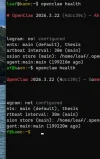
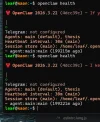
I have a similar problem when running commands that display special characters. I run TCC inside windows terminal and ssh into a unix box and run "openclaw health" and everything is fine. When I run take command and tcc then ssh into a unix box and run "openclaw health" the special characters do not display and the terminal becomes unusable after that. The wrapping is off and keys don't work properly. This is with v35 and with v36 and the same font in both windows terminal and take command. I attached screenshots of the two. So I switched to using windows terminal and simply running tcc as the default shell inside windows terminal, which works better. Hope this helps others.
 

Attachments

  • tc-openclaw.webp
    tc-openclaw.webp
    32.7 KB · Views: 7
  • wt-openclaw.webp
    wt-openclaw.webp
    36 KB · Views: 7
Back
Top