| Internet |

Contents
If you are not familiar with the purpose or use of the Internet configuration dialog, review the main configuration dialogs topic before continuing.
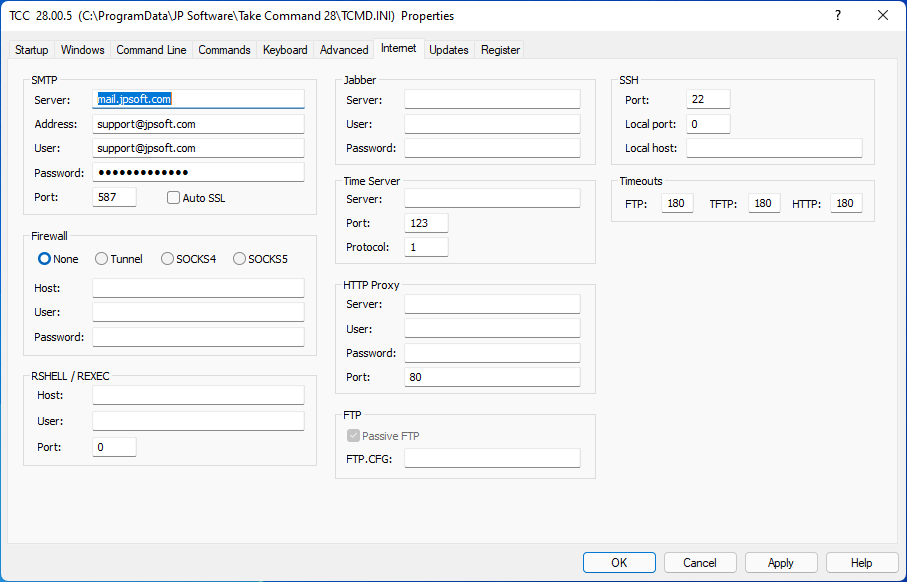
SMTP:
Server : The SMTP server name to use in SENDMAIL and SENDHTML for outgoing mail. (If not set, TCC will attempt to get the address from the registry.)
Address : The email address to use in SENDMAIL and SENDHTML for outgoing mail. (If not set, TCC will attempt to get the current user's email address from the registry.)
User : The email username (if your SMTP server requires it for authentication).
Password : The email password of the user (if your SMTP server requires it for authentication).
Port : The SMTP port number for use by SENDMAIL and SENDHTML. (The default port number is 25).
Auto SSL : If checked, SENDMAIL and SENDHTML will use Auto SSL negotiation. If the remote port is set to the standard plaintext port, TCC will use Explicit mode. In all other cases, SSL negotiation will be implicit.
Firewall:
Type : The type of firewall in use on your network.
Host : The server name of the firewall (if any) for FTP and HTTP access.
User : The user name if the firewall requires authentication.
Password : The password if the firewall requires authentication.
RSHELL / REXEC:
Host : The name of the local host or user-assigned IP interface through which connections are initiated or accepted (for REXEC and RSHELL).
User : The name of the user on the local machine (for RSHELL).
Port : The port number (or communication endpoint) in the local machine to bind to for REXEC and RSHELL.
Timeouts:
Set the timeout (inactivity) period in seconds for FTP, TFTP, and HTTP operations.
JABBER:
Server is the JABBER server to log into.
User : The default user name for logging onto a Jabber server and sending IM's via the JABBER command.
Password : The logon password for the default Jabber user.
Time Server:
Time Server : The URL for the internet time server for TIME /S. If no server is specified, TIME uses clock.psu.edu.
HTTP Proxy:
Server : The proxy server address to use for HTTP calls
User : The user name if Basic authentication is to be used for the HTTP proxy.
Password : The user password if Basic authentication is to be used for the HTTP proxy.
Port : The proxy port number to use for HTTP calls.
FTP:
Passive FTP : Set passive mode for FTP calls (sometimes required by a firewall).
FTP.CFG : Specify the location and name of the file containing the FTP user names and passwords, and optionally the directory format for non-standard FTP servers. The default is FTP.CFG in the Take Command installation directory. See Using FTP/HTTP Servers for details.
SSH:
SSHPort : The port on the SSH server where the SSH service is running (default is 22).
SSHLocalPort : The TCP port in the local host where IPPort binds.
SSHLocalHost : The name of the local host or user-assigned IP interface through which connections are initiated or accepted.