Welcome!

By registering with us, you'll be able to discuss, share and private message with other members of our community.

SignUp Now!

36.52.87 command prompt and output scrambled

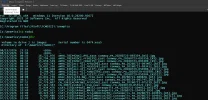
I just installed the 36.52 version over the original 36, and now the command prompt is scrambled, and the output of commands is chopped .
Below, the top is 36.52, and the one below is 32. I typed "C:\" and then "dir".
Screenshot 2026-08-15 111251.webp

The original 36 that I was using was working as it should. I don't have the original 36 to reinstall.
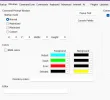
 
I'm still having problems. The ANSI stuff is gone, but the cursor starts before the prompt's end, and lines are being truncated. The 32 version's output is in the 2nd attachment.
Screenshot 2026-08-16 103010.webp
 

Attachments

  • Screenshot 2026-08-16 103728.webp
    Screenshot 2026-08-16 103728.webp
    261.9 KB · Views: 16
I looked up asciicast. It says it will record "ConPTY terminal sessions". Sorry, but I don't know what they are.
Keep in mind, I was using TakeCommand 36, the original when it was first available, with no problems. This started when I installed the 36.52.87 version the other day. That wiped out my original version 36 of TakeCommand and that version of the TCMD.INI, since the date modified is today. I'm attaching the one that's there now.
 

Attachments

@Steven M. Geisler

Just an idea ...

Do you set/call a THEME or so (within start.btm)? That could be the reason, because now, themes are supported natively which wasn't the case with beginning of v36 ...
 
No. The only theme I have is in "Options/Styles", Office 2016 black. I have no start.btm or any others except the JPSoft ones.
So when I looked at the themes, I saw Fonts also. In 32, I had Fonts selected as Extra Large.
I don't know what was in 36 (because it's gone), but I don't believe I changed it. I think I just used the same one I had in 32. But I notice now, in 36.52, there are 5 choices. System default is the first. I clicked that and restarted. Then it seems to be working. However, the font was way too small for me. So, I changed "Tab Windows" to Lucinda Console regular 12, which I've always used in Kedit, and it truncated again. So, I changed it to 10, and it went back to being way too small. So I tried 11. That seems to work. But I'd rather have 12.

It looks like (to me) the new font selections are not working correctly, but what do I know?
 
Still not reproducible here, regardless of the font size.

Are you using ConPTY tab windows, or the old conhost-style tabs?

Try launching a TCC console session (either in WT or the bare console and doing the DIR there. (It's not clear to me whether your issue is with TCMD or with TCC.)
 
I was able to reproduce your issue on another machine using your TCMD.INI.

The problem is with the Lucida Console font, which is providing the wrong information to DirectWrite about the font ligatures. If you set "TabPtyLigatures=NO" in your TCMD.INI, then Lucida Console should work.

A better solution would be to use a more modern font, like Consolas or Cascadia that has the correct ligature info.
 
I was able to reproduce your issue on another machine using your TCMD.INI.

The problem is with the Lucida Console font, which is providing the wrong information to DirectWrite about the font ligatures. If you set "TabPtyLigatures=NO" in your TCMD.INI, then Lucida Console should work.

A better solution would be to use a more modern font, like Consolas or Cascadia that has the correct ligature info.
Ok. Before I saw your response above, I was trying to do what you asked last night.
So, Lucinda 12 always screws up. 10,11,14,16,20 all worked.
When I started TCC.exe, Lucinda 12 worked.
I'm fine with using Consolas. So we can forget the problem with Lucinda.
BTW, when Lucinda 12 was selected, TakeCommand blew up several times when I tried to add a new tab in the TakeCommand window. Maybe you should remove it.

I do have a question, though. I was using "OPTIONS-STYLES-FONTS to change the font for "Tab Windows". Then I found on OPTIONS-Take Command-Windows" that there are 5 buttons to set fonts. Howerver, I didn't see any change of font in the Take Command window or TCC. What are they used for?
 
FWIW, I was having issues with JetBrainsMonoNL and ConPTY that I hadn't reported yet and setting "TabPtyLigatures=No" resolved them.
 
I do have a question, though. I was using "OPTIONS-STYLES-FONTS to change the font for "Tab Windows". Then I found on OPTIONS-Take Command-Windows" that there are 5 buttons to set fonts. Howerver, I didn't see any change of font in the Take Command window or TCC. What are they used for?

They are for menu, ribbon, and status bar fonts. The one for "Tab Windows" does change the font in the TCMD tab windows.
 
The next build (36.52.88, which will be uploaded today) checks the font for bad ligature values and disables them.
Thanks Rex. What surprises me is that the "NL" in JetBrainsMonoNL stands for "No Ligatures" - it's the sans-ligatures version of JetBrainsMono. So confusing that it would have bad ligature values.

EDIT: Removed the setting of "TabPtyLigatures=No" and installed 36.52.88. Worked perfectly.
 
Back
Top