- Jan
- 18
- 0
By registering with us, you'll be able to discuss, share and private message with other members of our community.
SignUp Now!
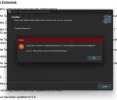
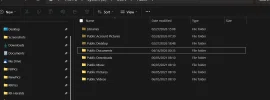
ok. the File Explorer that I attached above says the file is "C:\Users\Public\Public Documents," but the DIR command in Take Command says it is "Public\Documents" as it should be. It has one directory in it from Adobe.The correct directory name is "c:\users\public\documents". I've never seen a "c:\users\public documents" before.
Is there a "Datamystic" folder in your "c:\users\public documents"?
Should I manually create the DataMystic directory and try it?ok. the File Explorer that I attached above says the file is "C:\Users\Public\Public Documents," but the DIR command in Take Command says it is "Public\Documents" as it should be. It has one directory in it from Adobe.
Hooray for desktop.ini!ok. the File Explorer that I attached above says the file is "C:\Users\Public\Public Documents,"
Should I manually create the DataMystic directory and try it?
OK. After manually creating a couple of folders and getting the same error on the next one, I finally got a notification from Windows Security. It eventually took me to "Ransomware Protection." It was turned on. I turned it off and tried again, and it installed with no problems.Yes; that should at least verify whether it's a permissions error.