Welcome!

By registering with us, you'll be able to discuss, share and private message with other members of our community.

SignUp Now!

Existing LIST does not scroll/clear window

Jun
877
18
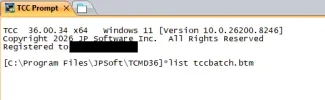
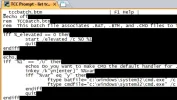
If you use LIST to view a file, then type Esc to exit, the window is not cleared or scrolled. So, you have the command line at the top of the window and the file contents is still displayed and whatever you type overwrites this. This happens in a ConPTY tab in Take Command, in TCC in Windows Terminal, and in TCC in conhost.

TCC 36.00.34 x64 Windows 11 [Version 10.0.26200.8246]
 
Almost the same here, except no overwriting of text after with TCC via WT ConPTY. I HAVE overwriting with TCC Conhost.
 
in addition: the colors are off. I use "black on bright white" on default; set with the TCMD option dialog.

I forgot to mention: the color issue does not happen in conhost.

2nd edit: the color issue also happens in "select". Moreover, both "list" and "select" do not use the inverse color as the screen shots might suggest, but they use the "standard" color "white on black". I have confirmed this by temporarily switching the console to something resembling "pink on cyan".
 

Attachments

  • ScreenA.webp
    ScreenA.webp
    11.9 KB · Views: 20
  • ScreenB.webp
    ScreenB.webp
    24.3 KB · Views: 21
Last edited:
If you use LIST to view a file, then type Esc to exit, the window is not cleared or scrolled. So, you have the command line at the top of the window and the file contents is still displayed and whatever you type overwrites this. This happens in a ConPTY tab in Take Command, in TCC in Windows Terminal, and in TCC in conhost.

TCC 36.00.34 x64 Windows 11 [Version 10.0.26200.8246]

Fixed in build 35 (already uploaded).
 
in addition: the colors are off. I use "black on bright white" on default; set with the TCMD option dialog.

I forgot to mention: the color issue does not happen in conhost.

2nd edit: the color issue also happens in "select". Moreover, both "list" and "select" do not use the inverse color as the screen shots might suggest, but they use the "standard" color "white on black". I have confirmed this by temporarily switching the console to something resembling "pink on cyan".

See this thread: SELECT color in ConPTY tab
 
I was just coming to the forums to mention it. I was trying out the new version and even though Rex has said in the past "use View, not List", old habits die hard.

As usual Rex is right on top of the fixes though, much appreciated!
 
My problem with VIEW is a new window opens. I already have the Take Command or TCC window where I want to see something. If I wanted another window, I'd just run my text editor.
 
Last edited:
Back
Top