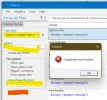
Two "major" problems with FSearch.exe (both highlighted in the image)
- If I open the program and retrieve the values stored in the "history" of the drop-down fields (highlighted in yellow), the [Find All] button remains disabled. To enable it, you must select a path from the [Look In] button [...]
- If I try to use "Save" or "Save As..." from the File menu, the alert shown in the image appears.
I don't know if "Save" does this, since it generates an error, but it would be nice to have the option (preferably in the clipboard:) of having a list with only the names of the files found.
Thanks
- If I open the program and retrieve the values stored in the "history" of the drop-down fields (highlighted in yellow), the [Find All] button remains disabled. To enable it, you must select a path from the [Look In] button [...]
- If I try to use "Save" or "Save As..." from the File menu, the alert shown in the image appears.
I don't know if "Save" does this, since it generates an error, but it would be nice to have the option (preferably in the clipboard:) of having a list with only the names of the files found.
Thanks