Welcome!

By registering with us, you'll be able to discuss, share and private message with other members of our community.

SignUp Now!

Problem with Input Text in v 36.50.68 x64

Aug
61
3
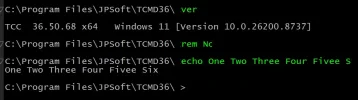
Something very strange is going on with input text in the newest version. There is no problem at all on my desktop systems, but on my high resolution laptop letters get doubled and don't show up even though they have been typed. Please see the attached screen capture. In the first line I typed "rem Now." Notice how the "o" is truncated and the "w" doesn't appear at all. In the second line I typed "echo One Two Three Four Five Six." The output proves that this is what I typed, but look at how the input is displayed. Somehow the "e" in "Five" was doubled and the "ix" in "Six" don't appear at all. Very strange.

Note that my laptop resolution is 3072 x 1920 scaled to 200%. I tried changing the scale to 100% (which makes the text very tiny), but this didn't solve the problem. I also tried removing the TCC Windows setting that makes my input green and returning that to default, but again this didn't solve the problem. I am at a loss for what else to try, so I am assuming that this is a bug in the new display engine. Am I right?
 

Attachments

  • Screenshot 2026-07-01 094255.webp
    Screenshot 2026-07-01 094255.webp
    33 KB · Views: 12
Something very strange is going on with input text in the newest version. There is no problem at all on my desktop systems, but on my high resolution laptop letters get doubled and don't show up even though they have been typed. Please see the attached screen capture. In the first line I typed "rem Now." Notice how the "o" is truncated and the "w" doesn't appear at all. In the second line I typed "echo One Two Three Four Five Six." The output proves that this is what I typed, but look at how the input is displayed. Somehow the "e" in "Five" was doubled and the "ix" in "Six" don't appear at all. Very strange.

Note that my laptop resolution is 3072 x 1920 scaled to 200%. I tried changing the scale to 100% (which makes the text very tiny), but this didn't solve the problem. I also tried removing the TCC Windows setting that makes my input green and returning that to default, but again this didn't solve the problem. I am at a loss for what else to try, so I am assuming that this is a bug in the new display engine. Am I right?
Additional information:

I see in another post that there is discussion about the font used. Running
Code:
for /l %k in (0,1,2) echo %@TCFont[%k]
results in
Code:
Lucida Console
-29
700
where on my desktop the font height number is -16 rather than -29.

I also note that if I resize my window, all the text in the window is reset and looks fine. Thus, I'm think that the problem has to be related to input, not output.
 
Not reproducible here (tried it on 3 high-res laptops). I doubt it's the same issue as a couple of users have reported with subpixel rendering (that would affect a 1 pixel row, not insert a new character).

Questions: Does this happen only after scrolling? If you turn off the folding option (removing the left gutter) do you still see the doubled characters?
 
No, Rex, it doesn't happen only after scrolling. It happens as soon as I open a new tab. And I'm sorry, but I can't find the folding option despite the Help telling me it's in the TCC Configure Options. Please tell me where that is.
 
Just a standard TCMD tab that says TCC Prompt in the tab header. I found the Command Output Folding checkbox in the Advanced tab of the Take Command configuration options. I unchecked it. I closed and opened it again. No change in behavior. I tried unchecking the Show Marks and Result checkbox, too. No change in behavior. Thank you for your time.
 
Last edited:
Rex, for now I have gone back to v 35.00.21, which works just fine. I realize that this is a different display engine, but I just can't work with the new one's problems. I hope you can figure out what's wrong. If you'd like, I'd be happy to let you connect to my laptop so that you could see the problem yourself and potentially diagnose it given that you of course have far more extensive knowledge of your product than I do.
 
Thank you very much, Rex. Version 36.50.70 indeed solves the problem I reported. I am constantly amazed at your dedication to addressing customer issues. I know I speak for other customers when I say that that is sincerely appreciated. Jesse Heines, a 4DOS and 4NT customer since the 1990s. :)
 
Back
Top