Welcome!

By registering with us, you'll be able to discuss, share and private message with other members of our community.

SignUp Now!

How to? Regex not fully implemented? Don’t seem to be able to use the \q regex (which means quote mark) in %@ReReplace[]

Jul
576
10
I’m trying to highlight a quoted section of text that is being echo’ed the screen (command parameters actually).

So I want to use regex to insert color-change ansi before the first quote (to make it orange), and after the last quote (to make it yellow).

which requires me doing a @ReRegex with pattern matching on the quotes.
I want to substitute the first quote with orange+quote.
I want to substitute the last quote with qutoe+yellow.

I can do this in Perl just fine, but %@ReRegex doesn’t seem to work with \q for quote!

[Remember, I had a whole support issue in the past about regexes and quotes, and the answer was basically, "use \q for quotes in regex!". So I am following that advice and finding out that I can’t actually use \q for quotes in ReReplace]


Code:
echo %@REReplace[\q,{QUOTE},"How is "your" quest going?"]
1736772139283.webp


I don’t THINK i’m doing this wrong?
 

Attachments

  • 1736771900997.webp
    1736771900997.webp
    5.2 KB · Views: 85
This is where I got stuck..... [^\q] means don’t match quotes but it still matched the quotes at the end of the lyrics parameter and at the beginning of the filename parameter and only backfilled \2 at the very end of the string. I actually wanted the filename at the end to be yellow so that ONLY the lyric parameter was highlighted.

1736772201054.webp


Code:
>echo %@ReReplace[initial_prompt ([^\q]*),initial_prompt%ansi_color_orange%\1{HEYOO},"%LAST_WHISPER_COMMAND_FOR_DISPLAY_TMP%"]

"Faster-Whisper-XXL.exe --model=large-v2            --language=en --output_dir "C:\MP3\MISC\1980s\changerrecent" --output_format srt --vad_filter True   --max_line_count 1 --max_line_width 20 --ff_mdx_kim2 --highlight_words False --beep_off --check_files --sentence --verbose True --vad_filter=True --vad_threshold=0.1 --vad_min_speech_duration_ms=150 --vad_min_silence_duration_ms=200 --vad_max_speech_duration_s 5 --vad_speech_pad_ms=198 --vad_dump --best_of 5 --max_comma_cent 70 --max_gap 2.0 --initial_prompt"Oh Mickey, you're so fine. You're so fine, you blow my mind, hey Mickey, hey Mickey. You're so fine, you blow my mind, hey Mickey.  Hey Mickey. You've been around all night, and that's a little long. You think you've got the right, but I think you've got it wrong. Why can't you say goodnight? So you can take me home Mickey?  'Cause when you say you will, it always means you won't. You're givin' me the chills, baby, please, baby don't. Every night you still leave me alone Mickey.  Oh Mickey, what a pity, you don't understand. You take me by the heart when you take me by the hand. Oh Mickey, you're so pretty, can't you understand. It's guys like you, Mickey. Oh what you do Mickey, do Mickey, Don't break my heart, Mickey.  Now when you take me by the hooves, who's ever gonna know. And every time you move I let a little more show. There's something you can use, so don't say no Mickey.  So come on and give it to me anyway  you can. Anyway you want to do it, I'll take it like a man. But please baby, please don't leave me in the damp Mickey."  "Toni Basil - Mickey (12'' Version).flac""{HEYOO}
 
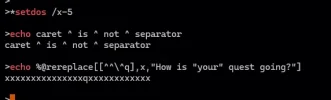
@REREPLACE's first parameter is a regular expression. I don't know what "\q" is supposed to be. This works (my escape character is ^). ^q is a quote (to TCC); \^q makes it a regular expression.

Code:
v:\> echo %@rereplace[\^q,{quote},"How is "your" quest going?"]
{quote}How is {quote}your{quote} quest going?{quote}
 
OMG Thank you!

I was basically at the final step of this screenshot, but without the ^ before q ... which fixedi t!

It does beg another question though....For me, ^ is my command separator, not my escape character. So whyd oes this still work? I guess it’s being strictly interpreted as regex. But the regex for quote is \q, not \^q ...
.. I’m pretty confused about how this works, but I’m glad it works.

1736787179918.webp
 
You’re right. I totally glitched.
This explains why it’s not working in my actual case. I was just about to come back here.

Today’s my 51ˢᵗ birthday. One step closer to dementia haha
 
Anywho, here’s my real-world example that I was trying to simplify before.

it works fine with the "not backslash" regex at the end, i.e. [^\\]* to match "any character that isn’t a backslash"

But try doing that with the quote! Is it impossible?

So in this case, it highlights "c: of the filename after, which is undesired behavior.


1736789760933.webp


Code:
if not defined ANSI_COLOR_BRIGHT_YELLOW set ANSI_COLOR_BRIGHT_YELLOW=%@CHAR[27][93m
if not defined ANSI_COLOR_ORANGE set ANSI_COLOR_ORANGE=%@CHAR[27][38;2;235;107;0m


set LAST_WHISPER_COMMAND_FOR_DISPLAY_TMP="Faster-Whisper-XXL.exe --model=large-v2            --language=en --output_dir "C:\mp3\Cats Millionaire\2013 - Figaro The Kid + Yellow Bile - Go Hard" --output_format srt --vad_filter True   --max_line_count 1 --max_line_width 20 --ff_mdx_kim2 --highlight_words False --beep_off --check_files --sentence --verbose True --vad_filter=True --vad_threshold=0.1 --vad_min_speech_duration_ms=150 --vad_min_silence_duration_ms=200 --vad_max_speech_duration_s 5 --vad_speech_pad_ms=198 --vad_dump --best_of 5 --max_comma_cent 70 --max_gap 2.0 --initial_prompt "Hey, What's up, what's up. (Up, up, up)  I see you workin' at the mall. See you workin' at the mall. At the mall.  I see you working at the mall. At Forever 21, selling tanks and shawls. You wanna quit your job? You need a place to go? Girl, run your own show. But don't be on some ho s---. Bounce with something cute on. I kiss into a fog zone. I be really off. And searching for some water though, though.  Bottles on chill, I got that gold chain flu. Little lady on my side. Show me how you ride out. Be a good one and I'll take you to my hideout. Pretty little -----,dripping like some water though. I be on that straw, and coming for that lo lo. What I did, let her go. She's back now.  At the mall, At the mall. The mall, The mall.  The mall, mall, mall, mall, mall.  Mall, mall.  Do you really, really, really wanna go hard?  (At the mall, at the mall)"  "c:\mp3\Cats Millionaire\2013 - Figaro The Kid + Yellow Bile - Go Hard\Figaro the Kid + Yellow Bile - 1_Go Hard (normal mix).mp3""

echo        set LAST_WHISPER_COMMAND_FOR_DISPLAY=%@ReReplace["(initial_prompt..)([^\\]*)","\1%ansi_color_orange%\2%ansi_color_bright_yellow%","%LAST_WHISPER_COMMAND_FOR_DISPLAY_TMP%
"]

echo That’s great and all but how to highlight ONLY the lyrics without also highlithing the [" "c:] afterward....
 
it works fine with the "not backslash" regex at the end, i.e. [^\\]* to match "any character that isn’t a backslash"

But try doing that with the quote! Is it impossible?
What ... replace any character that's not a quote?

Code:
v:\> echo %@rereplace[[^^\^q],x,"How is "your" quest going?"]
"xxxxxxx"xxxx"xxxxxxxxxxxxx"
 
Thanks!

Very curious....

Your solution works in a fresh TCC window with no INI/TCSTART:
1736795530199.webp


But i can’t get it to work in MY tcc with MY environment:
1736795569660.webp


What the?!?!?!?! I can’t imagine what I could possibly be setting that would be making this not work.
 
What the?!?!?!?! I can’t imagine what I could possibly be setting that would be making this not work.

Um ... TCC's escape character? You change it from the default, don't you? I reckon that's done in _ININAME or _TCSTART.
 
fun side comment - just now i hit a situation where hitting up arrow and oging into the command history killed the I/O completely. console still there, can still paste into it with warning about pasting multiple lines, but nothing displays
 
Oops i misspoke.

My escape character is actually the +/- symbol, i needed something that would never come up in anything anybody would reasonably type into a song lyric or any other value i might want to process as an environment variable.

So here i am redefining my escape char to be ! (what do normal people use????)

No escape char. No command separator.

Still doesn’t work in my environment but still does in a fresh environment.

1736798339236.webp
 

Attachments

  • 1736797626616.webp
    1736797626616.webp
    8.2 KB · Views: 81
1736799289321.webp


Of course that's not going to work if your escape character is '!'. In the above, all three of those ^s are TCC escape characters. The first one excapes the second one so the regular expression will contain a real caret ([^...], character not in class). The third one is part of ^q, TCC's escape sequence for a double quote ... it gives a quote without the missing-quote error. Prefix it with a regex escape char, \^q and you get the literal quote in the regex.

If your TCC escape character is '!' the '^' is no longer special so just put it right in the regex.

Code:
v:\> setdos /e!

v:\> echo %@rereplace[[^\!q],x,"How is "your" quest going?"]
"xxxxxxx"xxxx"xxxxxxxxxxxxx"
 
Gotcha! That was my issue, not knowing which is which. Thank you so much for the solution!
 
I honestly feel the command separator character should not be processed if it’s a parameter to a %@FUNCTION[]. I can’t think of a reason why other than speed.
 
Back
Top