Welcome!

By registering with us, you'll be able to discuss, share and private message with other members of our community.

SignUp Now!

transparency issue as of TCC 36.50 (Windows Terminal)

Apr
25
2
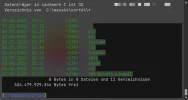
When using TCC within Windows Terminal with transparency enabled, the background is handled differently as of TCC 36.50. Currently, some parts of the background get completely opaque:

1783414289610.webp


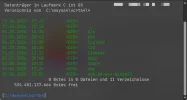
In previous versions transparency was applied consistently:

1783414311192.webp
 

Attachments

  • 1783413611981.webp
    1783413611981.webp
    50.8 KB · Views: 12
  • 1783413637738.webp
    1783413637738.webp
    50.6 KB · Views: 15
Last edited:
Aaargh, yes, sorry. I haven't checked the color settings on my test machine. The output foreground color was set to light gray. When changing it to default, the background looks as expected again. ANSI colors are also enabled and they work fine so far.

Thank you for the fast replies and sorry for the noise.
 
Sorry, there actually seems to be an issue with ANSI colors. I just restarted the terminal with all color settings at default and ANSI colors enabled. Now the background transparency doesn't seem to work properly again and looks as in the first screenshot. With TCC 36.01.55 it works as expected.
 
The issue is still present in TCC 36.52.81. Some parts of the background are painted fully opaque in colored outputs like DIR (as shown in the first screenshot above).
These are my color settings:

1786094114122.webp
 
Thanks for tracking down the issue. Is the new build already available for download somewhere or are you still preparing the new release?
 
Back
Top