Options

Contents
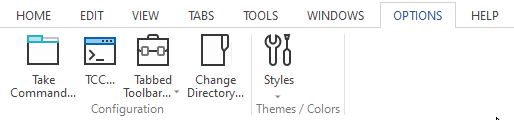
Take Command
Opens a dialog which you can use to change the Take Command configuration.
TCC
Opens a dialog which you can use to change the TCC configuration. This dialog does not affect any existing TCC windows, only new ones. If you want to change the configuration of an active TCC window, use the TCC OPTION command.
Tabbed Toolbar
Create a new toolbar button or tab, or save or reload the toolbar settings in TCMD.INI.
Change Directory
Change the current directory for Take Command (not the apps running in the tab windows). Take Command normally inherits its current directory from the app that started it (or the shortcut).
Styles
Select a predefined theme for Take Command. This will change the color and appearance of the Take Command window and its components (such as the tab window labels). You can also change the default font size.
The available styles are:
Office 2007 Blue
Office 2007 Silver
Office 2007 Black
Office 2007 Aqua
Office 2007 System
Office 2010 Blue
Office 2010 Silver
Office 2010 Black
Office 2013 System
Office 2013 Light
Office 2013 Dark
Office 2016 White
Office 2016 Colorful
Office 2016 Gray
Office 2016 Black
Windows 7
Windows 10 Light
Windows 10 Dark