Command Line

Contents
If you are not familiar with the purpose or use of the Command Line configuration dialog, review the main configuration dialogs topic before continuing.
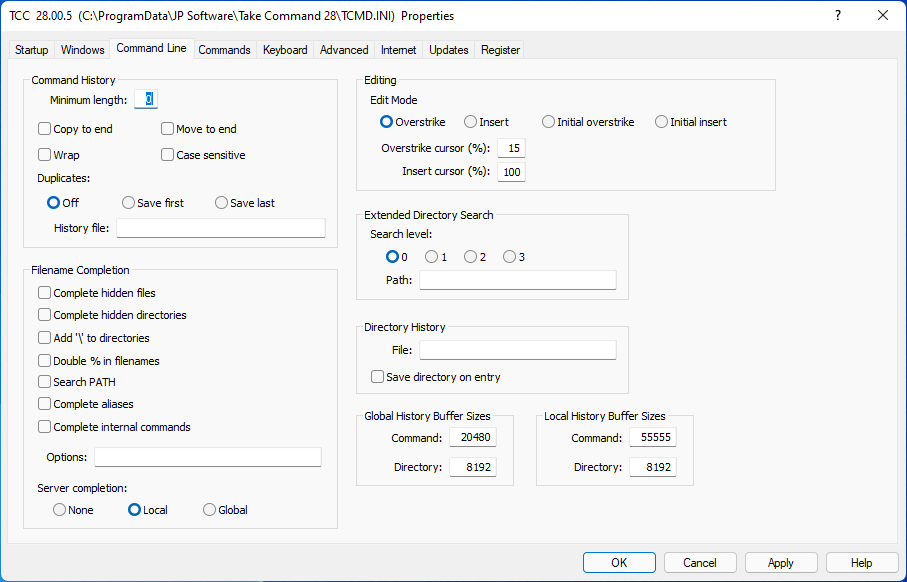
Command History:
Minimum Length : Set the minimum command line size to save in the command history list. Any command line whose length is less than this value will not be saved. Legal values range from 0, which saves everything, to 8192. You can prevent any command line from being saved in the history by beginning it with an "at" sign ("@"). See also the HISTORY command.
Copy to end : This option controls what happens when you re-execute a line from the command history. If this option is set, the line is appended to the end of the history list. The original copy of the command is always retained at its original position in the list. If this option is set, it will override Move to End.
Move to end : If enabled, a recalled line will be moved to the end of the command history. The difference between this directive and Copy to end is that Copy to end copies each recalled line to the end of the history but leaves the original in place. Move to end copies the line to the end of history and removes the original line. This directive has no effect if Copy to end is set.
Wrap : If enabled, the command history "wraps" when you reach the top or bottom of the list (so the list appears "circular"). If this option is disabled, history recall will stop (and beep) at the beginning and end of the list rather than wrapping.
Case Sensitive : If enabled, the command history comparisons will be case sensitive.
Duplicates : Controls duplicate entry placement in the history list.
| Off | Always add new entries |
| Save First | Add new entry only if it does not match any old entries |
| Save Last | Add new entry unconditionally, and delete matching older entries |
History File : Load the specified history list file before running TCSTART, and save the command history to the file after running TCEXIT. You should include the full pathname.
Filename Completion:
Complete hidden files : If enabled, hidden and system files will be displayed by filename completion.
Complete hidden directories : If enabled, hidden directories will be displayed by filename completion. CDD /S will also index hidden directories if this option is set.
Add '\' to Directories : If enabled, a \ (backslash) is automatically appended to directory names (or / to FTP directories) in filename completion.
Double % in filename : If enabled, and the filename has embedded % characters, and the first argument on the command line is an internal command, the % characters will be doubled so that variable expansion won't delete (or unexpectedly expand) the filename. (This will not affect filenames on lines beginning with aliases or variables.)
Search PATH : If enabled, the directories in the PATH variable are searched if a match isn't found in the current directory.
Complete Aliases : If enabled, TCC will tab complete alias names at the command line.
Complete Internal Commands : If YES, TCC will tab complete internal command names at the command line.
Options : Sets the files returned during filename completion for selected commands. The format is the same as that used for the FILECOMPLETION environment variable. Note that specifying any options for a command here will override the default filename completion options (such as complete hidden files & directories). See Customizing Filename Completion for a detailed explanation of selective filename completion.
Server Completion : Configures server name completion (see Filename Completion for information on how to use server name completion). Local lists only local servers (i.e., those in your "network neighborhood"). Global will enumerate the entire network. None will disable server completion; this may be necessary to prevent "hanging" if you start typing a server name and accidentally press Tab, and your local domain is very large or slow to respond.
Editing:
Edit Mode : Starts the command line editor in either Insert or Overstrike mode. If you specify Initial Overstrike or Initial Insert, the command line editor will start in the specified state, but if you toggle insert mode while editing a line, the editor will continue to use the new mode on subsequent lines. See also: SETDOS /M.
Overstrike Cursor : The shape of the cursor for insert mode during command line editing, and all commands which accept line input (DESCRIBE, ESET, etc.). The size is a percentage of the total character cell size, between 0% and 100%. Because of the way video drivers map the cursor shape, you may not get a smooth progression in cursor shapes as Insert Cursor and Overstrike Cursor change. If you set Insert Cursor and Overstrike Cursor to -1, the cursor shape won't be modified at all. If you set them to 0, the cursor will be invisible. See also: SETDOS /S.
Insert Cursor : The shape of the cursor for overstrike mode during command line editing and all commands which accept line input. The size is a percentage of the total character cell size, between 0% and 100%. See also: Overstrike Cursor (above) and SETDOS /S.
Extended Directory Search:
Search Level : Configure extended directory searches. 0 disables extended searches. For complete details on the meaning of the other settings see Extended Directory Searches.
Path : The path to JPSTREE.IDX, the file used for the extended directory search database.
Directory History :
| File : Load the specified directory history list file before running TCSTART, and save the directory history to the file after running TCEXIT. |
| Save Directory on Entry: TCC normally saves the previous directory to the directory history when you change to a new directory. This option saves the new directory to the directory history when you change directories. |
History Buffer Sizes
Command History : Set the amount of memory allocated to the command history list (in characters). The allowable range of values is from 4,000 to 500,000. If you use a global history list, this value is ignored in all sessions except that which first establishes the global list. (To change the size, you will need to close all of the TCC windows, and any SHRALIAS session.)
Directory History : Set the amount of memory allocated to the directory history list (in characters). The allowable range is 1,000 to 50,000. If you use a global directory history list, this value is ignored in all sessions except that which first establishes the global list. (To change the size, you will need to close all of the TCC windows, and SHRALIAS session.)